Virtual Memory Explained
Overview
Nowadays it's not uncommon for computers to be running hundreds of processes at a time. By this fact two major concerns arise: security and resource management. On one hand each application should be mostly isolated one from another. You wouldn't want Notion to be spying on what tabs are open in your Chrome browser. And on the other you might be running these applications on an old laptop which doesn't have enough RAM to handle all of them at once.
These are the problems virtual memory solves. And that's what this video explains. I recommend you first give it a watch and come back here afterwards to read my written explanation. Although note that I've made some very slight mistakes here and there in said video. Thankfully these were all clarified in a comment I made and pinned in the comments section of said video.
Just for good measure I'll correct them here as well, but feel free to skip this list and watch the video, or maybe simply get on with the first chapter of this document:
- I misspelled the Level 4 Page Map Table as "PLM4" instead of PML4 throughout the video.
- At 6:15 I wrote 412 by accident. The number should be 512.
- I realized just now that my illustration of page sizes might have been confusing. Regular pages are of 4KB which is 4096 bytes. Not 4096KB (just to be crystal clear)
- The table entries contain a bit called the "present" bit (the rightmost bit). It's called that because as long as it is 1 it means the page is in memory. As soon as it is 0 it means the page is on disk, and when it is on disk the bits used for the physical page index are used to locate the page on disk instead.
What is memory?
Memory is not an easy thing to define as it exists in many forms. Although all formats of memory share one common property: they're all states of disturbance in matter. For example, hard drives store data on magnetic disks by changing the orientation of tiny magnetic fields on the disks' surface. Then it can read the data back by measuring the orientation of these fields. Electronics only care about two states of disturbance. That's why it's well known that computers operate in binary. Binary comes from the word bini in latin meaning two. I could say that the decision of whether or not I shall go to the park is binary, because it's composed of only two possible choices.
My point is that when we refer to binary we can mean many things as long as they are directly related to the principle of two. For instance, binary is also a number system. You see, we were taught to count in a number system called base ten (decimal). It consists of 10 possible distinct digits from which we can derive infinitely many numbers: 0, 1, 2, 3, 4, 5, 6, 7, 8 and 9. Binary on the other hand is base 2. Its numbers can only consist of the digits 0 and 1. But that's not the only property we can discern between number bases. Let's start by taking the decimal number 11, but put in binary:
The parentheses and the suffix 2 is to let us know that the number is specifically in base 2 (binary) and not the decimal number 1011. So how do we convert this back to base 10? To do so we'll need to read the number from right to left, convert each digit to its decimal value and sum all of the results together.
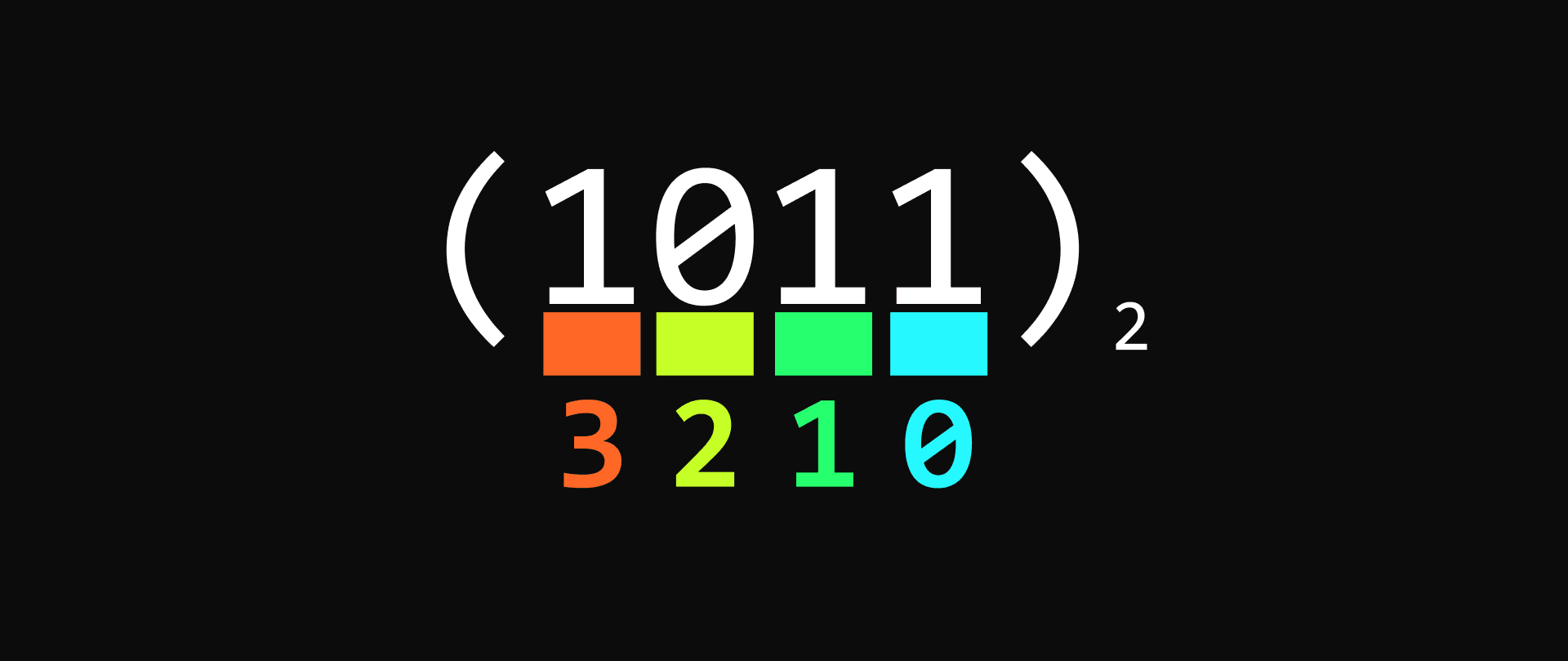
In the above illustration I assigned the appropriate index to each digit of the concerned binary number from right to left starting from 0. This is a very important step because each one of these indices represent the power of the digit at said position. Since we're working with base two, the power is , where n is said index. The digit itself represents the product by which we multiply the result of that power. Here's a full depiction below:
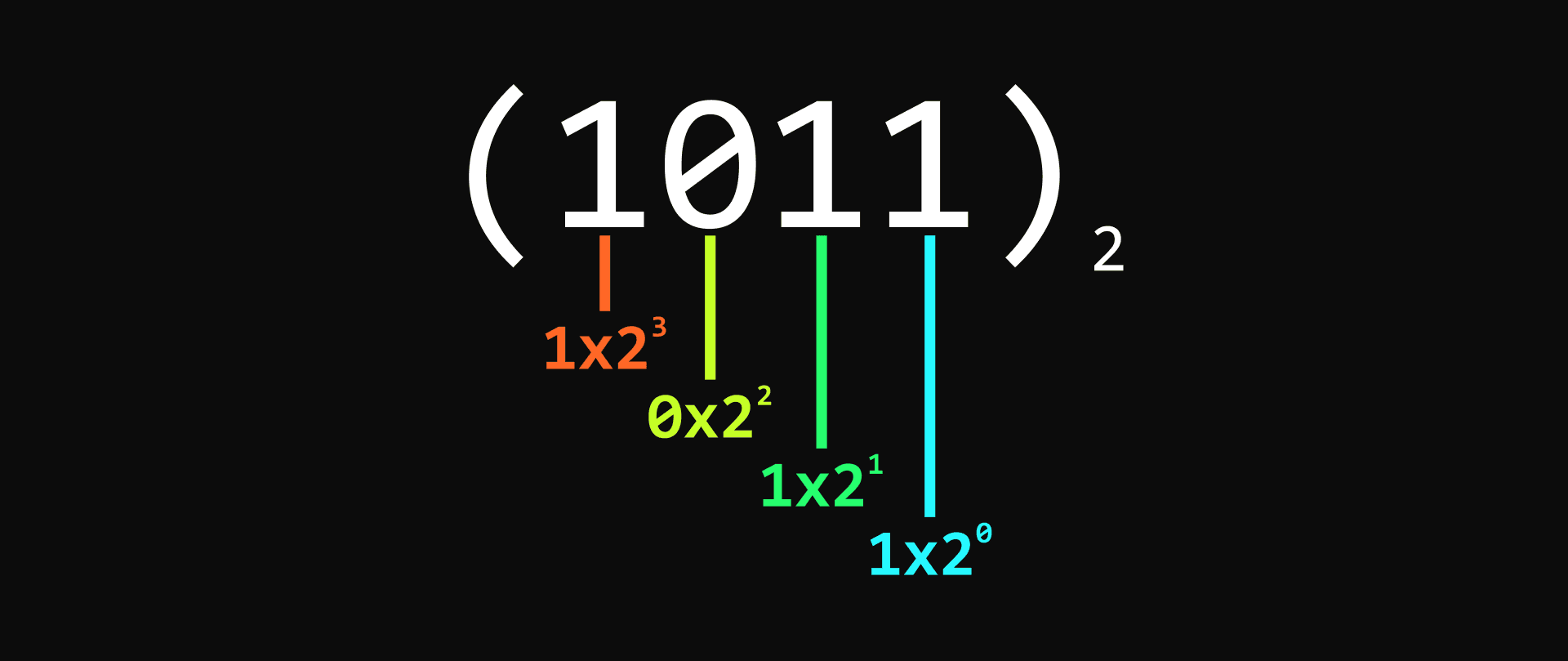
The result would be:
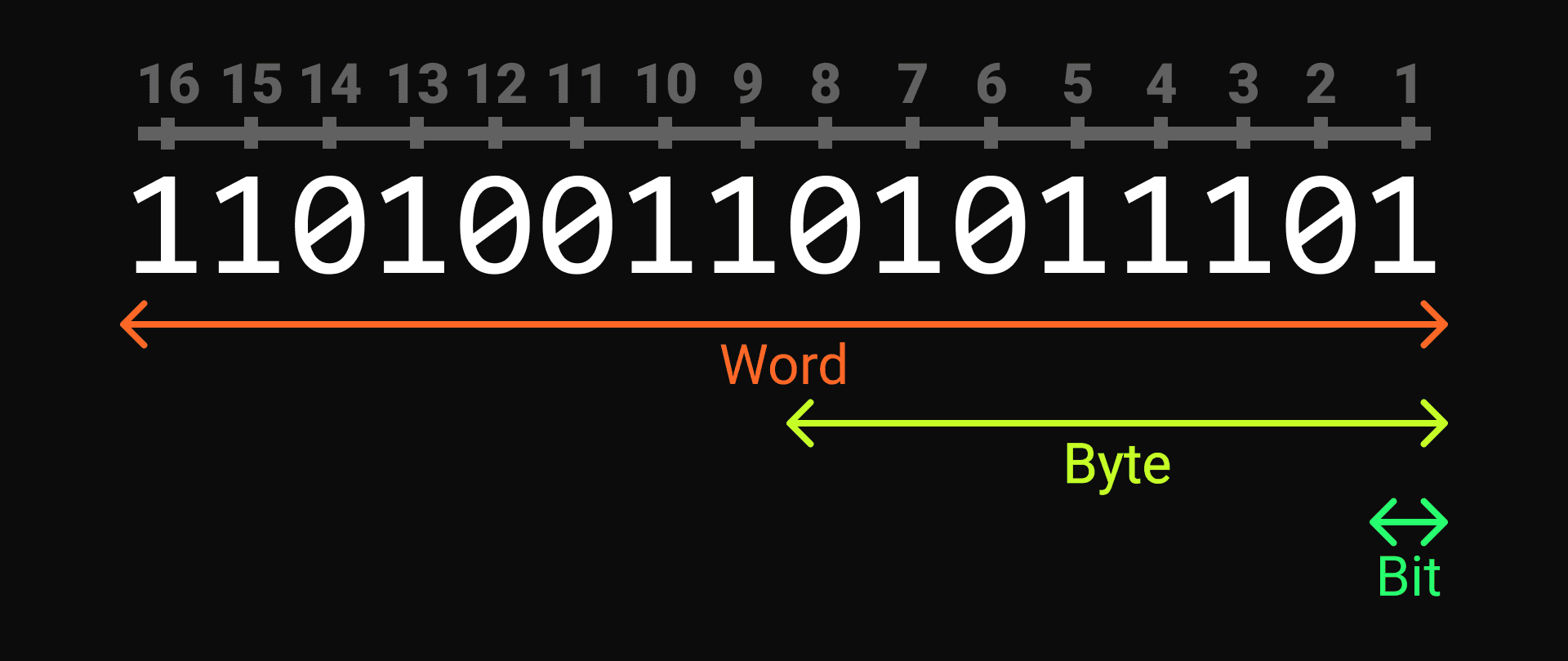
A single binary digit is called a bit. The number we were working with was 4 bits. Bits are a unit of measurement used to quantify memory just like you use centimeters to quantify length. And just like such measurements we have other names to simplify larger values. In the case of bits we have bytes. One byte is 8 bits. Then for 2 bytes, or 16 bits, there is the word (it's literally called word). Here's a depiction of these measurements:
The format of memory we'll mostly care about today is random access memory (RAM). This medium is volatile meaning the method it uses to read and write bits is temporary. When you cut the power to your machine all of its contents are lost. It's also the second fastest storage format in computers after in-processor memory, and that's where programs are stored while executing.
So how is your computer able to tell which parts of RAM it should access when it needs to read or write anything? It uses something known as addressing. Every single byte in memory has its own unique address, like houses on a street. Address 0 would lead to the first byte in memory, and address 1 to the second.
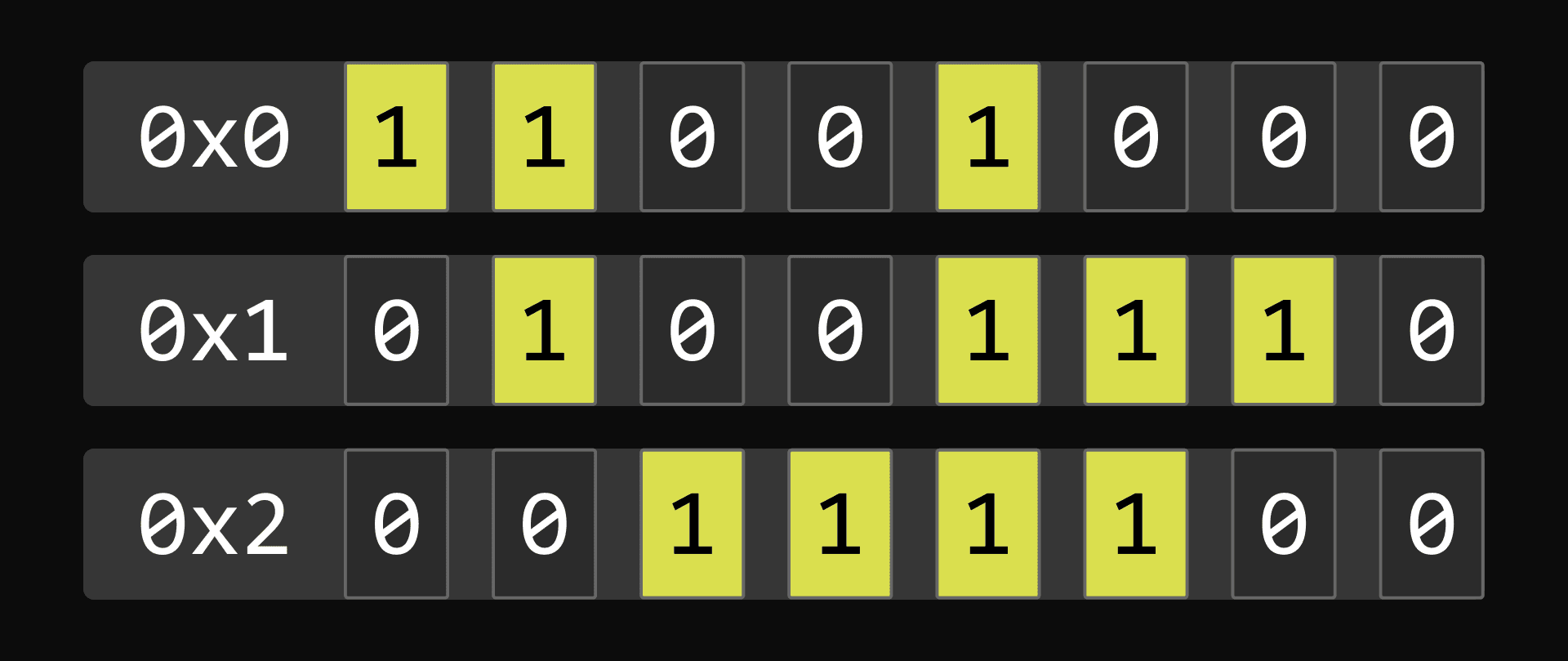
The figure above provides an example of memory addressing. Each row consists of a byte (8 bits) and is indexed as such (row 1 is 0x0, row 2 is 0x1 and row 3 is 0x2). You may be wondering why we prefix each address by "0x". That's because these numbers are in a base called hexadecimal. We won't dive into the details, but essentially when working with addresses we often express them in terms of hexadecimal numbers rather than decimal as they can get pretty large, and base 16 supporting 16 different digits per power it tends to make the numbers look much simpler. "0x" is just a prefix to make it clear the base is 16. Thankfully in this case the numbers translate directly to decimal since they don't go above 9 and remain in the first power.
How can hexadecimal support this many digits if we only know up to 9? It uses the alphabet. Here are all the possible digits: 0, 1, 2, 3, 4, 5, 6, 7, 8, 9, A, B, C, D, E and F, where F equals 15 in decimal.
Memory paging
Imagine your computer only had 28 kilobytes of RAM. You decide to open Discord and Minecraft so you can play bedwars with your friends. The thing is, you remember it's the holidays and your friends are all busy. So you close Discord and open Chrome instead.
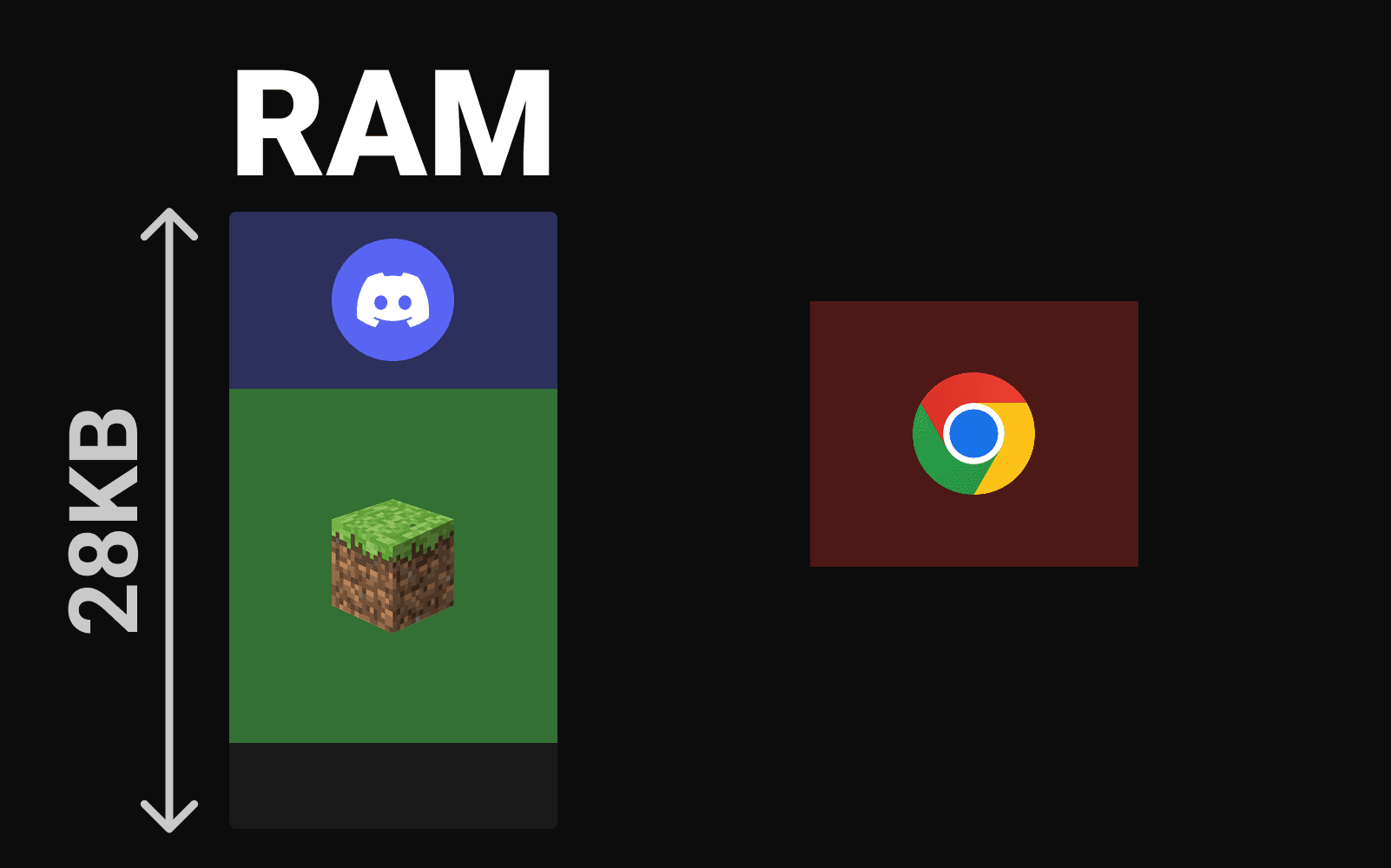
As illustrated in the above figure there's an issue. Chrome requires too much memory to be placed where Discord was, and it can't possibly fit under Minecraft. So what would happen? Well luckily virtual memory is enabled and so memory is divided in equal-sized 4 kilobytes chunks called pages (this scenario is theoretical and ignores the fact that the operating system itself would also be taking up memory).
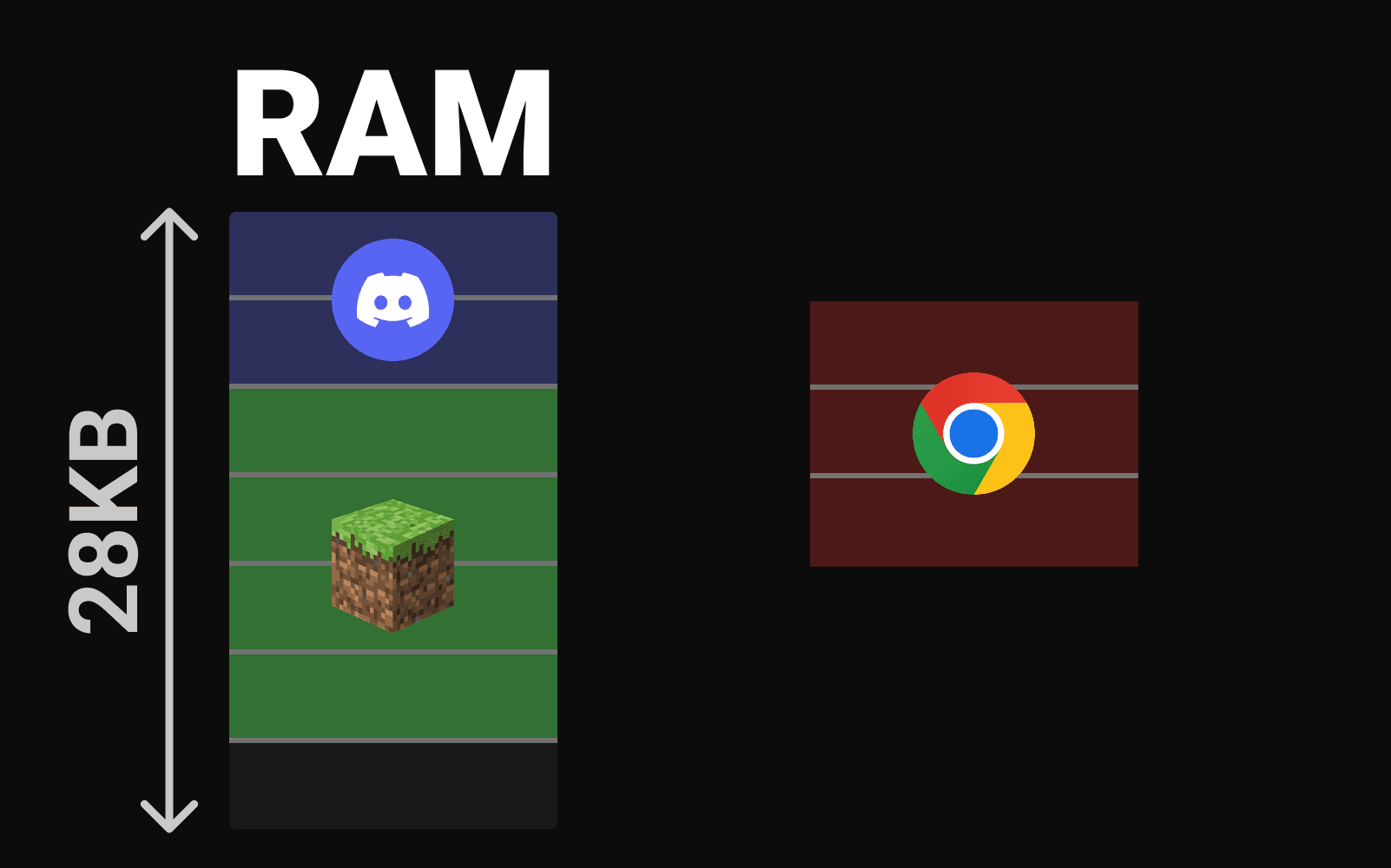
The system can take the first two pages of Chrome, fit them where Discord was, and take the remaining page and fit it under Minecraft. That's memory paging.
But what if that memory page couldn't fit under Minecraft because say the calculator app was using up that last page. Well the system could take a memory page that hasn't been used in a while, say the third page from Minecraft, stored it on the main SSD, and place Chrome's page in the now empty space.
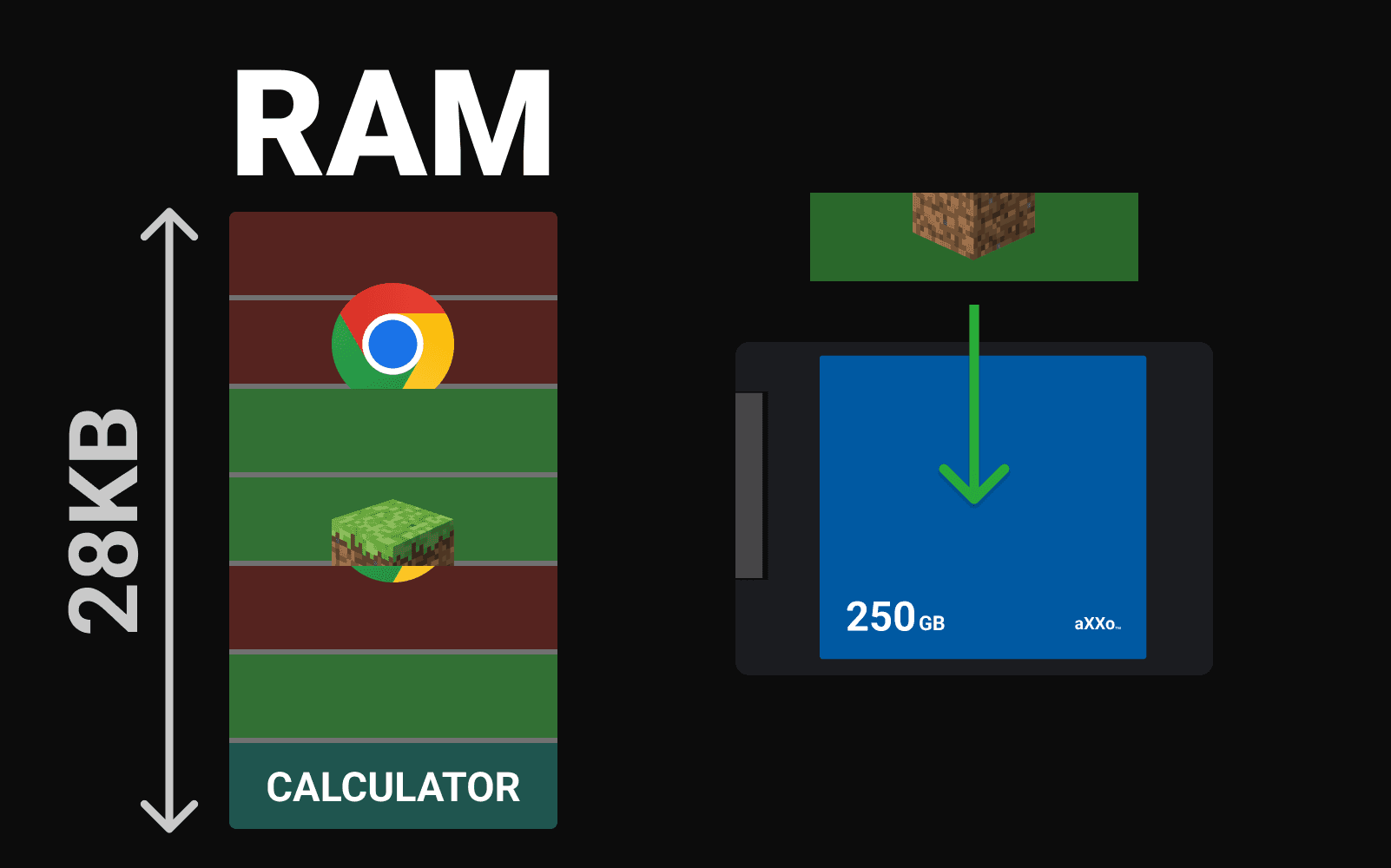
When Minecraft will need its page again a page fault will occur. This is essentially the CPU raising its hand to say that it can't find the memory page at the specified address. When this happens the operating system steps in, and locates the needed page on disk, finds another rarely-accessed page, and essentially switches the two. During this entire process Minecraft has to wait until its page is loaded into memory. This is still a fairly fast process, but ideally you always have enough memory so that this never has to happen.
Memory tables
When a program requests memory like when it gets executed, or needs to load resources like an image, the operating system will create those pages we discussed and list them in a series of tables specific to each program. Let's say a program tries to access address 0. Before this happens, the operating system will store the location of that program's page tables in the CR3 register.
The CPU will now translate said address using the specified these tables using a specialized unit known as the memory management unit, or MMU for short. The tables I keep mentioning are actually a hierarchy of 4-levels of tables working together each with 512 entries:
- The level 4 page map table (PML4).
- The directory pointer table (PDPT).
- The page directory table (PD).
- The page table.
It's a lot like finding a book in a giant library. You'd pick the floor, then the section, then the shelf, and finally the exact book itself. The addresses the program's access are called virtual addresses. They basically work like a note on which you wrote the exact steps to take to reach the book based on those criteria.
First, the CPU looks at the CR3 register, which points to the PML4 table of the program. The PML4 is like the floor. We use 9 bits from the virtual address (bits 39-47) as an index to select one of its 512 possible entries. Each entry points to a different Page Directory Pointer Table.
Once we have the right PDPT (the section), we use the next 9 bits of our virtual address (bits 30-38) to select one of its entries. This entry points us to a specific Page Directory Table.
Following the same pattern, we use 9 more bits (bits 21-29) to index into the Page Directory Table (the shelf), which directs us to a specific Page Table (the book).
Finally, we use yet another 9 bits (bits 12-20) to index into the Page Table itself. This entry contains the base physical index of the actual 4KB memory page we're looking for (this would be like the exact page of the book we want to read from our library example). I want to highlight that the entry stores the physical page “index”, and not address. I'll get back to this detail later.
The last 12 bits of the virtual address (bits 0-11) represent the "offset" within the 4KB page, specifying the exact byte we want from those 4,096. So to racap a 48-bit virtual address is composed of:
- 9 bits for PML4 index
- 9 bits for PDPT index
- 9 bits for PDT index
- 9 bits for PT index
- 12 bits for page offset
I mentioned that the page table entries store the physical page “index” and not the physical address of the pages themselves, and that's because there's no need to. Since all the pages are of 4KB in size, we can simply index over them. For example the page of index 5 would be at physical address 20'480 in decimal (That's 5 multiplied by 4096. The size of a memory page in bytes).
This means the table entries don't need to use their full 64 bits just to store pointers. The remaining bits are used for things like specifying access permissions like read-only or read-write, if the pages can be executed as code, or if they're accessible to user-level programs.
This makes sense for the page table, but what about the other three tables? They don't point to 4KB memory pages, but to other tables of pointers right? Yet they also only use about 40 bits to store the "pointers". Remember that each table has 512 entries, and each entry is 64 bits (8 bytes). If you do the math: 512 entries 8 bytes = 4096 bytes, which is exactly 4KB! This means all tables in our hierarchy are themselves exactly one memory page in size, allowing for them to be indexed the same way!
Identity mapping
Now you might wonder: how does the CPU know when to treat an address as virtual versus physical? The answer is that after boot, your operating system explicitly enables memory paging by setting specific control registers. Once paging is enabled, the CPU treats almost all addresses as virtual.
If the OS needs to access physical memory directly, it uses "identity mapping". It creates virtual address mappings that point to the identical physical addresses. For example, mapping virtual address 0x1000 to physical address 0x1000. The translation process still occurs, but the end result is the same address you started with.
Translation look-aside buffer
The process of translating addresses can become very costly in performance. That's where the Translation Lookaside Buffer (TLB) comes in. The TLB is a specialized cache just for address translations, similar to how the L1, L2, and L3 caches work for instructions and data. It stores recently used virtual-to-physical translations to avoid the cost of walking the page tables repeatedly.
Why use all these tables?
At this point you may still be wondering why virtual memory even needs the 4 tables system it uses? Why not just store all the translations in one big ass table? The thing is: with a single table, you'd need an entry for every possible page in the entire address 48-bits address space. Each entry is 8 bytes so that would get massive real fast.
By using a four-level hierarchy, the system only allocates tables for memory regions your program actually uses. It's like writing a grocery list that only includes items you need, instead of also listing all the products you don't need.
 Subscribe